


Emergencies move fast, your tools should too
CORA keeps call-takers calm, consistent, and confident.
Purpose-Built for Call-Takers
Designed for the demands of the job
CORA gently brings the guidance you need to the surface, so call-takers can stay focused on the caller.
Surfaces the right checklist instantly
CORA pulls up the exact SOP or protocol your center uses, according to the details of that incident without the need to search or switch systems.

Detects the call type in real time
CORA listens to what’s happening in CAD and identifies when a rare or high-risk call needs additional guidance.

Contextual guidance in real time
As the call unfolds, CORA brings forward precise reminders tailored to the incident, the geography, and the center’s operations, to ensure call-takers always know the right way to respond.


SOPS, Instantly Searchable in CORA
Your knowledge base, built in
Aurelian hosts your SOPs and internal documentation in one searchable place, making it easy to find the right procedure during a call.


Capture the Details That Matter
Never miss a beat
CORA tracks details as they come in and highlights what call-takers still need to ask so they can get a holistic picture of the situation.

Real-time support, built in
Key capabilities
Live SOP checklists
Delivers real-time, step-by-step guidance so call-takers always follow the correct procedures for every call.
Smart reminders
Provides automatic prompts that adjust on the fly based on call details to keep workflows consistent and accurate.
Real-time guidance
Captures performance metrics during the call to enable quality insights instead of waiting for post-call reviews.
Fully customizable widgets
Displays critical information in a configurable “windshield” tailored to your center’s exact SOPs, workflows, and priorities.
GIS-driven awareness
Adapts questions and guidance to local risks and highlights emerging patterns, such as repeated calls from the same address.
Supervisor dashboard
Offers a real-time, view of center activity so supervisors can track calls, monitor workload, review guidance usage, and listen in live.

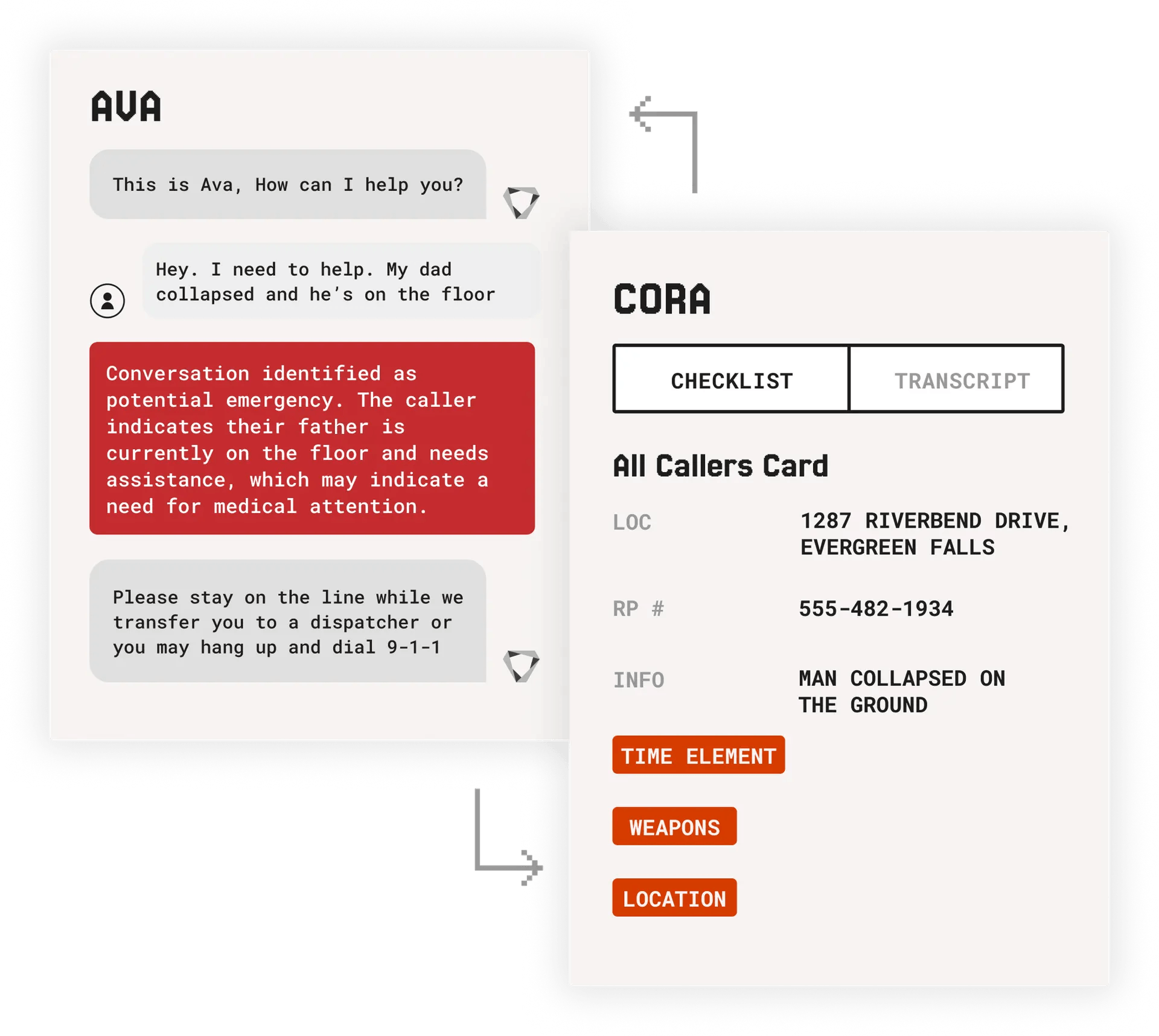
Seamless Handoff from Ava to Cora
AVA and CORA
AVA analyzes non-emergency calls in real time and transfers them instantly when an emergency is detected. CORA intakes caller details, location, incident type, and key statements from AVA to open the right checklist and transcript automatically. Call-takers don’t start from scratch. They simply continue the call. The warm handoff saves time, eliminates duplicate questions, and moves critical information to the right place faster.
Built for proactive support
Insight across every call
A live overview of center operations.


Call volume
Track call volume in real time to quickly spot surges or unusual patterns and adjust staffing or support as needed.
Alerts
View the real-time reminders going out to call-takers, tailored to the specific incidents they’re handling as well as the center’s operational needs.
Average call duration
Monitor average call duration to identify shifts in workload, performance trends, or emerging call types that may need additional support.
Live listen
Listen in on active calls in real time, giving supervisors immediate insight and the ability to support call takers exactly when they need it most.
Select console
Select any dispatch position to see what calls were handled there, making it easy to review workload, performance, and support needs for specific call-takers.
Edit layout
Customize the dashboard layout to fit your workflow, and the information that matters most in the arrangement that works best for your center.

See CORA at work
Want to see how CORA supports call-takers? See how CORA can support your team in real-time, and schedule a demo today.
